






O SZKOLE
DZIENNIK ELEKTRONICZNY

FILM O NAS
Jakość powietrza z airly.eu
W ZAKOPANEM...
W TEJ CHWILI
Odwiedza nas 226 gości oraz 0 użytkowników.
BIP

Jesteśmy na


Dostępność
Narodowy Program Rozwoju Czytelnictwa


KOMUNIKAT DLA RODZICÓW DZIECI KORZYSTAJĄCYCH ZE STOŁÓWKI SZKOLNEJ
Od roku szkolnego 2026/2027 zmienia się sposób wnoszenia opłat za obiady.
Wpłaty za obiady należy dokonywaćwyłącznie przelewem z dołu do 15 - tego każdego miesiąca za miesiąc poprzedni. Przy nieterminowych wpłatach system automatycznie nalicza odsetki.
Każdy uczeń otrzyma indywidualny numer rachunku bankowego, dostępny w dzienniku elektronicznym Vulcan w zakładce Opłaty.
W przypadku rodzeństw są to także oddzielne indywidualne rachunki. Opłat za obiady należy wpłacać wyłącznie na przypisany numer konta – dla każdego dziecka osobno.
Informacja o kwocie do zapłatyrównież pojawi się w zakładce Opłaty.
W tytule należy podać: imię i nazwisko ucznia oraz klasę.
Aplikacja mobilna > konto danego dziecka > więcej > opłaty
Przegladarka internetowa eduvulcan.pl > konto dziecka > panel rodzica > szkoła > opłaty
Jednocześnie informujemy, że zgłaszanie nieobecności dziecka będzie możliwe bezpośrednio w dzienniku elektronicznym Vulcan poprzez samodzielne oznaczenie nieobecności.
Nasza szkoła bierze udział w programie SZKOŁA MYŚLENIA POZYTYWNEGO. Jest to pierwszy kompleksowy program wspierania zdrowia psychicznego dzieci i młodzieży.

Wywiadówki w dniu dzisiejszym są nadal aktualne.

W SP1 zaczynamy kolejna już edycję projektu INSTALING.
Dlaczego InstaLing?
Ucz się efektywnie: Najlepsze efekty daje krótka, ale systematyczna nauka. Rozwiązuj codziennie kilkuminutowe sesje, poznawaj nowe słówka, utrwalaj te, które zostały już poznane i powiększaj swoją znajomość słownictwa każdego dnia.
Używaj gdziekolwiek jesteś: Pragniemy umożliwić ci codzienną naukę w dowolnych warunkach. W domu, w szkole, w autobusie. Na komputerze, tablecie lub smartfonie. Z InstaLing możesz korzystać wszędzie.
Obserwuj postępy: Monitoruj postępy i systematyczność pracy swoich uczniów/dzieci dzięki dostępowi do przejrzystych raportów i zobacz ich zaangażowanie w naukę słownictwa.

Pierwsze w tym roku szkolnym zebrania rodziców z klas I-III odbędą się w czwartek 10.09.2026 r. według poniższego harmonogramu:
Klasa:
1a o godz. 17:00 w sali 24
1b o godz. 17:00 w sali 25
2a o godz 16:30 w sali 21
2b o godz. 16:30 w sali 23
3a o godz. 16:30 w sali 17
3b o godz. 17:00 w sali 5
Podkategorie
Joomla!
Extensions
The Joomla! content management system lets you create webpages of various types using extensions. There are 5 basic types of extensions: components, modules, templates, languages, and plugins. Your website includes the extensions you need to create a basic website in English, but thousands of additional extensions of all types are available. The Joomla! Extensions Directory is the largest directory of Joomla extensions.
Components
 Components are larger extensions that produce the major content for your site. Each component has one or more "views" that control how content is displayed. In the Joomla administrator there are additional extensions such as Menus, Redirection, and the extension managers.
Modules
 Modules are small blocks of content that can be displayed in positions on a web page. The menus on this site are displayed in modules. The core of Joomla! includes 24 separate modules ranging from login to search to random images. Each module has a name that starts mod_ but when it displays it has a title. In the descriptions in this section, the titles are the same as the names.
Content Modules
Content modules display article and other information from the content component.
User Modules
User modules interact with the user system, allowing users to login, show who is logged-in, and showing the most recently registered users.
Display Modules
These modules display information from components other than content and user. These include weblinks, news feeds and the media manager.
Utility Modules
Utility modules provide useful functionality such as search, syndication and statistics.
Navigation Modules
Navigation modules help your visitors move through your site and find what they need.
Menus provide your site with structure and help your visitors navigate your site. Although they are all based on the same menu module, the variety of ways menus are used in the sample data show how flexible this module is.
A menu can range from extremely simple (for example the top menu or the menu for the Australian Parks sample site) to extremely complex (for example the About Joomla! menu with its many levels). They can also be used for other types of presentation such as the site map linked from the "This Site" menu.
Breadcrumbs provide users with information about where they are in a site.
 Templates give your site its look and feel. They determine layout, colours, typefaces, graphics and other aspects of design that make your site unique. Your installation of Joomla comes prepackaged with three front end templates and two backend templates.
  Plugins are small task oriented extensions that enhance the Joomla! framework. Some are associated with particular extensions and others, such as editors, are used across all of Joomla. Most beginning users do not need to change any of the plugins that install with Joomla.
 Park Site
Park Blog
Here is where I will blog all about the parks of Australia.
You can make a blog on your website by creating a category to write your blog posts in (this one is called Park Blog). Each blog post will be an article in that category. If you make a category blog menu link with 1 column it will look like this page, if you display the category description then this part is displayed.
To enhance your blog you may want to add extensions for comments, interacting with social network sites, tagging, and keeping in contact with your readers. You can also enable the syndication that is included in Joomla (in the Integration Options set Show Feed Link to Show and make sure to display the syndication module on the page).
Photo Gallery
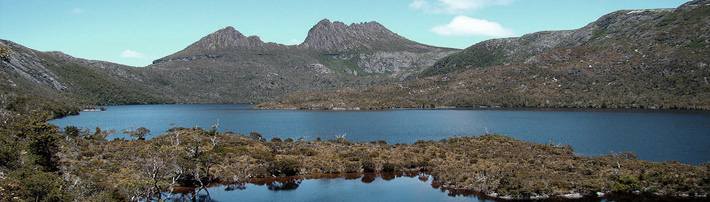
These are my photos from parks I have visited (I didn't take them, they are all from Wikimedia Commons).
This shows you how to make a simple image gallery using articles in com_content.
In each article put a thumbnail image before a "readmore" and the full size image after it. Set the article to Show Intro Text: Hide.
Fruit Shop Site
Growers
We search the whole countryside for the best fruit growers.
You can let each supplier have a page that he or she can edit. To see this in action you will need to create a user who is in the suppliers group.
Create one page in the growers category for that user and make that supplier the author of the page. That user will be able to edit his or her page.
This illustrates the use of the Edit Own permission.